
Download SelectHealth – health plan management, medical cost estimator, premium payment, claims tracking, deductible tracker, urgent care wait times, health insurance app
Overview
The SelectHealth app is a free Android application designed to support individuals enrolled in SelectHealth plans, including those with individual, family, and employer-sponsored coverage. As a business and productivity tool within the finance subcategory, it enables users to manage key aspects of their health insurance on the go. The app provides on-demand access to essential plan details such as ID cards, medical cost estimates for specific services, and real-time updates on claims for medical, dental, and pharmacy services.
Users can monitor their progress toward deductibles and out-of-pocket maximums, which helps in planning healthcare expenses. The app also includes functionality to pay premiums, though this feature is currently limited to individual plans. Additionally, it offers a unique tool for checking urgent care clinic wait times and allowing users to join virtual lines, improving access to timely care.
Designed for convenience and clarity, the app streamlines health plan management through a centralized interface, making it particularly useful for individuals seeking greater control over their healthcare experience.
Key Features & Capabilities
- Health Plan Access – Users can view their health plan details, including ID card information, directly from the app, eliminating the need to carry physical documentation.
- Medical Cost Estimator – The app allows users to input specific medical services or procedures to receive estimated costs, helping with budgeting and informed decision-making.
- Premium Payment (Individual Plans Only) – A dedicated feature enables users to pay their premiums securely, supporting financial management for individual policyholders.
- Claims Tracking – Real-time access to claims information for medical, dental, and pharmacy services allows users to monitor the status and payment history of their healthcare expenses.
- Deductible and Out-of-Pocket Tracker – The app displays how much of the deductible and out-of-pocket maximum has been met, providing transparency into coverage progress.
- Urgent Care Wait Times and Virtual Line Access – Users can view current wait times at nearby urgent care clinics and join a virtual queue, reducing in-person wait times and improving care access.
These features collectively support proactive health plan management, enabling users to make informed choices about care, track financial obligations, and optimize access to services. The app is especially valuable for individuals managing complex healthcare needs or those who prefer digital tools for financial and medical oversight.
User Interface, Workflow & Performance
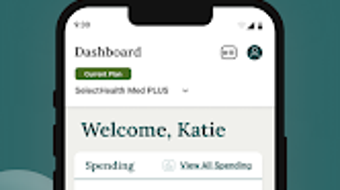
The SelectHealth app features a clean, intuitive interface with well-organized navigation, allowing users to quickly access key functions. Menus are structured logically, with clear icons and labels that enhance usability across different age groups and tech proficiency levels. The workflow for common tasks—such as checking claims, estimating costs, or joining a virtual line—is streamlined, minimizing steps and reducing user friction.
The app responds promptly to user inputs, suggesting stable performance under typical usage conditions. However, exact performance details such as CPU or RAM usage were not specified by the developer. The app’s size of 35.8 MB indicates a lightweight footprint, which generally contributes to efficient loading times and minimal storage impact.
The developer did not provide additional system requirements, so compatibility with older Android devices remains uncertain. Overall, the app appears optimized for smooth operation on modern Android devices, though performance may vary based on individual device specifications and network conditions.
Compatibility & System Requirements
The SelectHealth app is designed for Android operating systems and is currently available in version 2.5.1. It has a file size of 35.8 MB, indicating a compact installation footprint. The developer did not specify exact system requirements, including minimum Android version, RAM, or processor details.
As a result, compatibility with older or lower-end Android devices cannot be confirmed. Users are advised to ensure their device meets the requirements of the Google Play Store’s standard app distribution policies. The app is available exclusively through the Google Play Store, and no alternative download sources are listed.
Platform compatibility information is limited, so users should verify functionality on their specific device prior to installation.
Pros and Cons
Pros
- Free to download and use, with no hidden costs
- Comprehensive health plan management tools in a single app
- Real-time claims and deductible tracking for financial transparency
- Medical cost estimator supports informed healthcare decisions
- Urgent care wait time and virtual line features improve access to care
- Secure, official distribution via Google Play Store
Cons
- Premium payment feature is limited to individual plans only
- Exact system requirements were not provided by the developer
- Available only on Android, with no support for iOS or other platforms
- Limited information on data security and encryption practices
- Performance on older devices may vary due to lack of specifications
FAQ Section
Is the SelectHealth app free to download and use?
Yes, the SelectHealth app is completely free to download and use. There are no subscription fees or in-app purchases required to access core features.
Which health plans are compatible with the app?
The app is designed for individuals enrolled in SelectHealth plans, including individual, family, and employer-sponsored plans. Users must be active members of a SelectHealth policy to access all features.
Can I pay my premiums through the app?
Yes, premium payments are supported, but only for users with individual plans. Employer-sponsored plans do not currently have this feature available.
Is the app available on iOS devices?
As of the current release, the SelectHealth app is only available for Android devices. There is no official iOS version listed in the Google Play Store or other public channels.
How secure is my personal health information in the app?
The app is distributed through the Google Play Store, which enforces security standards for applications. However, specific details about data encryption, privacy policies, or compliance with health data regulations were not provided by the developer.
Final Thoughts
The SelectHealth app stands out as a practical, user-friendly tool for individuals managing their health insurance. Its ability to consolidate plan details, claims, cost estimates, and urgent care access into a single interface offers tangible value for users seeking greater control over their healthcare experience. The inclusion of a medical cost estimator and deductible tracker promotes financial awareness, while the urgent care wait time feature enhances real-world access to care.
Although the app is limited to Android and lacks full transparency on system requirements and data security, its core functionality remains robust and reliable. For anyone enrolled in a SelectHealth plan, this app provides essential tools for managing health benefits efficiently. Download SelectHealth now to take full advantage of on-demand health plan management and seamless access to critical healthcare services.







